
Short answer: If your business is not showing up on Google, the usual culprits are an unverified or suspended Google Business Profile, wrong or missing categories, inconsistent name, address, and phone (NAP) across the web, a brand-new or thin website, or you are simply outside the searcher’s area, which Google calls proximity. Most of these you can check yourself in a few minutes. Start by searching your exact business name in an incognito window and opening your Google Business Profile dashboard to look for a verification or suspension flag.
Very few of these problems are permanent, and most have a clear fix. The trick is figuring out which one is actually happening instead of guessing. Below are the real reasons a local business goes invisible, how to check each, and what to do about it.
Key Takeaways
- The most common cause is a Google Business Profile problem: unverified, suspended, or missing entirely.
- Wrong categories and inconsistent NAP across the web quietly bury businesses that otherwise look fine.
- A brand-new or thin website and not being indexed yet keep you out of organic results until Google catches up.
- Sometimes nothing is broken: you show for people closer to your location (proximity) and lose to heavy competition further out.
- Check it yourself first: search your exact name incognito, look at your profile dashboard, then search your category plus city.
Why Your Business Isn’t Showing Up at a Glance
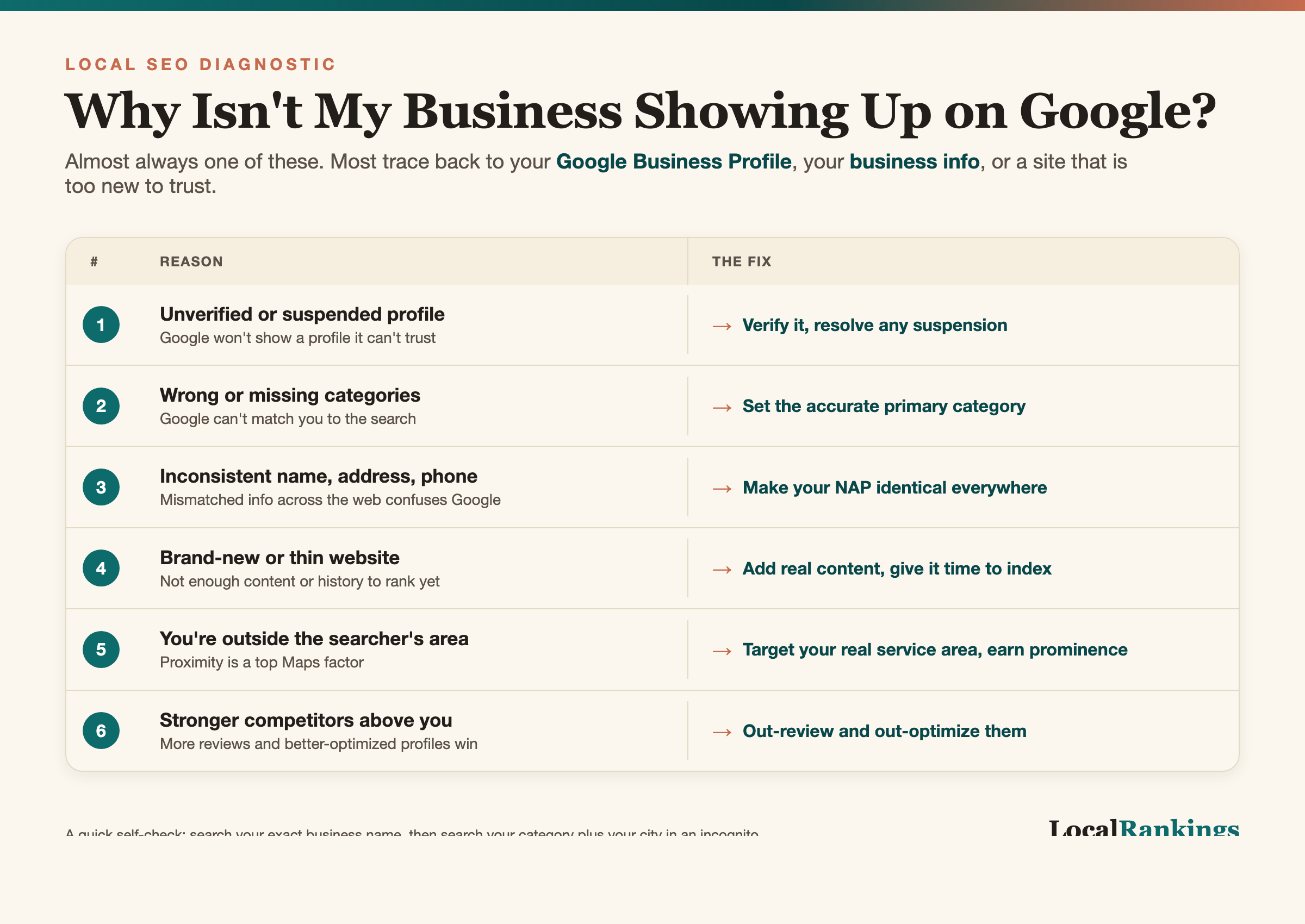
| Reason | What it looks like | The fix |
|---|---|---|
| Unverified or suspended profile | No profile appears, or a “suspended” notice in your dashboard | Verify it, or appeal the suspension with proof you are real |
| Wrong or missing categories | You show for your name but never for what you do | Set the correct primary category, add relevant secondary ones |
| Inconsistent NAP | Different name, address, or phone across listings | Make name, address, and phone identical everywhere |
| New or thin website | The site is live but ranks for nothing | Add real pages, service and location content, and reviews over time |
| Not indexed yet | The site does not appear even when you search its name | Submit it in Search Console and give Google time to crawl |
| Proximity or competition | You show near your office but not across town | Build reviews, content, and authority to widen your reach |
The Most Common Reasons (and How to Fix Each)
Your Google Business Profile is unverified or suspended. This is the number one reason a business is missing from Google Maps and the local pack. An unverified profile will not show, and a suspended one, usually flagged for a policy issue like a keyword-stuffed name or a virtual office address, disappears completely. The fix: claim and verify it, or appeal a suspension with real proof you exist, such as photos, a utility bill, or licensing. Do not spin up a second profile, because duplicates only make it worse.
Your categories are wrong or missing. Google uses your primary category to decide what searches you belong in. A plumber listed under “general contractor” will show for their name but almost never for “plumber near me.” Set the most accurate primary category, then add relevant secondary categories for your other services. This one change moves businesses more than almost anything else.
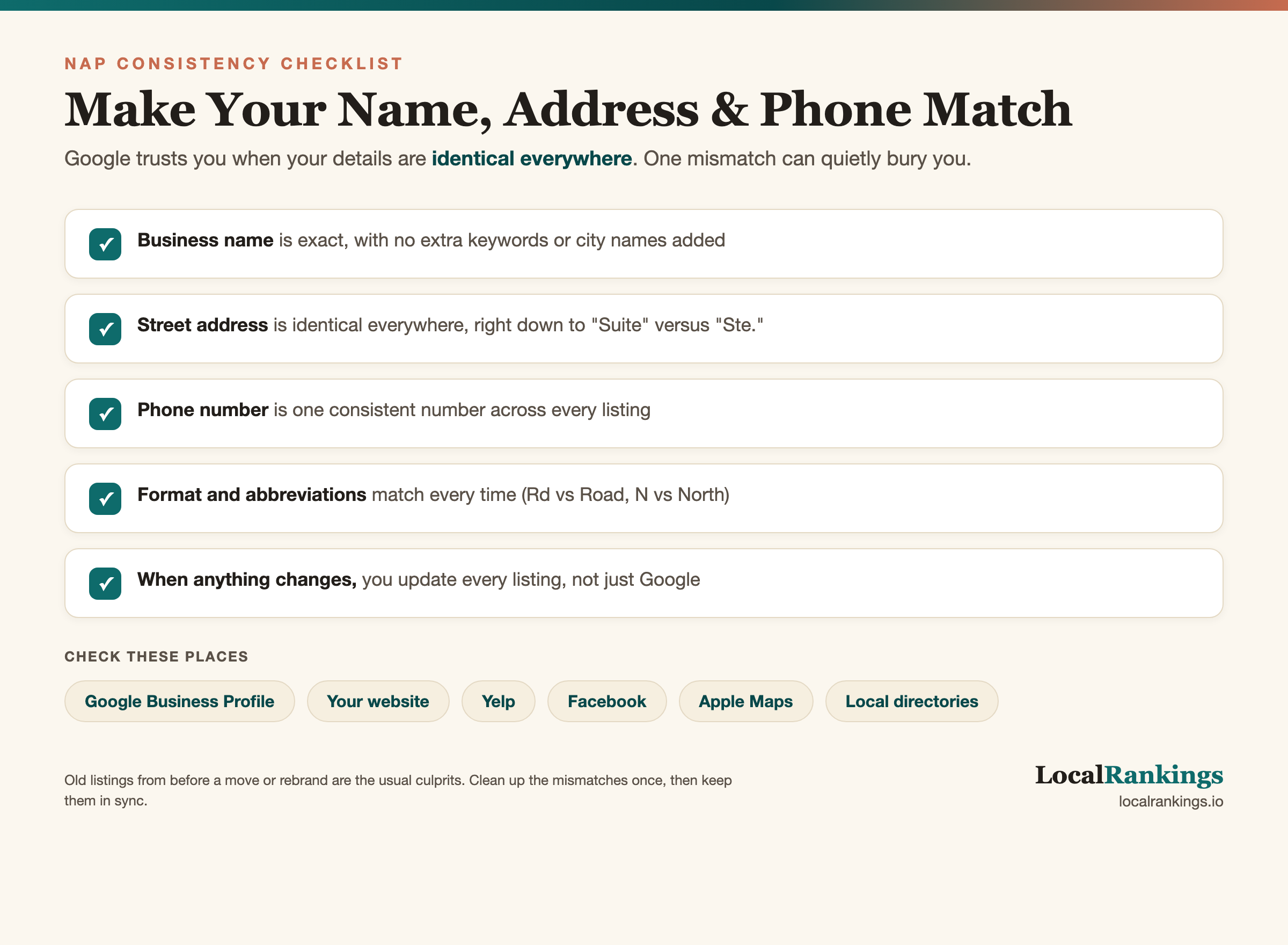
Your name, address, and phone are inconsistent. Google cross-references your business information across the web to trust that you are real and located where you say. If your NAP is different on your website, your profile, Yelp, and old directory listings, that mismatch erodes trust and rankings. Pick one exact format and make it identical everywhere, right down to “Suite” versus “Ste.”
Your website is brand-new or thin. A site that went live last month with three pages and no real content does not have the authority to rank yet. Google now leans hard on helpful content and real experience signals, often called E-E-A-T, so genuine photos of your work, real client stories, and dedicated service-area pages do far more than thin filler ever will. Add real service pages, a clear location, actual photos, and start earning reviews. This takes months, not days, and that is normal. Our guide on how long local SEO takes to work walks through the real timeline.
Your site is not indexed yet. If your business does not show up even when you search the exact page title, Google may not have indexed it. New sites, or sites blocked by a stray “noindex” tag or a bad robots file, stay invisible. Check Google Search Console, submit your sitemap, and request indexing, then be patient while Google crawls.
You are showing for people closer to your location. Proximity is a huge factor in local results, especially in Maps. Someone next to your shop sees you. Someone across the county sees the competitor near them. This is not a bug, it is how the Google map pack works. A roofer in Dade City might show up fine for a search near their shop off US 301 but get buried for the same search from Brooksville or Zephyrhills. This hits spread-out rural markets like Pasco and Hernando County hardest, where your customers can be twenty miles apart. It also plays out differently on a phone: most “near me” searches happen on mobile, and Google leans even harder on the searcher’s live location there than on desktop. You cannot move your building, but strong reviews, a complete profile, and real service-area content help you show up across a wider area.
You are a service-area business set up wrong. If you go to your customers instead of them coming to you, a plumber, an HVAC tech, a mobile detailer, your profile should be set up as a service-area business with your street address hidden and your real service cities listed. Get this wrong, list a fake storefront address or forget to set your areas, and Google may not show you where your customers actually are. This trips up a lot of home-service businesses across Pasco and Hernando County.
You are up against heavy competition. In a crowded market, established competitors with hundreds of reviews and years of history hold the top spots. You are not invisible, you are just below the fold. The fix is the long game: consistent reviews, useful content, and local authority that closes the gap over time.
A duplicate listing is getting filtered. If two profiles exist for your business, Google may filter or hide yours. This often happens after a move, a rebrand, or when someone created a listing you never claimed. Find the duplicate, claim it, and merge or remove it so one clean profile carries all your signals. Use Google’s official “Suggest an edit” option or a support request to resolve it, and go carefully: a sloppy merge or removal can take down the wrong listing and make things worse.
How to Check What’s Wrong
You can diagnose most of this yourself in about ten minutes:
- Search your exact business name. If nothing shows, the profile is likely unverified, suspended, or missing.
- Search in an incognito window. Your normal browser personalizes results. Incognito shows you closer to what a stranger sees.
- Open your Google Business Profile dashboard. Look for a verification prompt or a suspension notice at the top. That tells you a lot fast.
- Search your category plus your city, like “roofer Dade City.” If you never appear, categories, reviews, or proximity are likely the issue.
- Check Google Search Console. Confirm your site is indexed, see which queries you appear for, and catch crawl or indexing errors.
What LocalRankings Does
We are a Dade City, Florida local SEO and web design shop, and this is the exact problem we solve. When a business owner calls and says they are invisible on Google, we run the same diagnosis above, only deeper: profile status, categories, NAP consistency across the web, indexing, duplicates, and where you actually rank across your service area. Then we fix what is broken and build the signals that keep you showing up. You can see the full list on our services page.
If your business is not showing up and you want a straight answer on why, book a free 10-minute Google Business Profile audit and we will tell you exactly what is holding your Dade City or Tampa Bay business back.
Frequently Asked Questions
Why is my business not showing up on Google Maps?
The most common reason is an unverified or suspended Google Business Profile, because Maps only shows verified profiles. Wrong categories and proximity also play a role, so you may appear for people near your location but not for searchers across town.
How long until my business shows up on Google?
A verified Google Business Profile can appear in Maps within days. A new website usually takes weeks to get indexed and months to rank organically. If you just made changes, give Google time to crawl them before assuming something is broken.
Why did my business disappear from Google?
A business that vanished after showing was usually suspended, merged with a duplicate, or hit by a profile edit like a name or address change that tripped a policy flag. Check your dashboard for a suspension notice first, then look for duplicate listings that may be filtering yours.
How do I get my business to show up on Google?
Claim and verify your Google Business Profile, set the correct primary category, make your name, address, and phone identical everywhere, build a real website with genuine service and location content, and earn steady reviews. Those are the core signals Google uses to show you.
Why does my competitor show up but I don’t?
Usually because they have signals you do not yet: a verified, complete profile, the right categories, more reviews, and an established website. Proximity matters too, so if their office is closer to the searcher they show first. The gap is closable with consistent local SEO work over time.
Can a new business rank on Google?
Yes. A new business can appear in Google Maps quickly once its profile is verified, and it can rank organically over the following months as its website earns content, links, and reviews. It takes longer than an established competitor, but a clean profile and consistent effort get you visible.
Is it normal to not show up right after making changes?
Yes. Google has to crawl and process changes before they take effect, whether that is a new profile, updated categories, or new website pages. Profile changes can show in days, website changes often take weeks. If nothing has moved after a month, it is worth digging into a deeper cause.